Initial Condition and Source
The Initial Condition and State are volume conditions in the Cavitation module pertaining to selected Volumes. Specify Initial Condition and State in Cavitation module as follows:
- Geometric Entities Panel > Volumes > [Desired Volume]
- Properties Panel > Model Tab > Cavitation > (Initial Condition or State)
Initial Condition
|
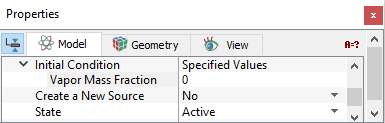
Initial Condition refers to the values of the independent variables used to start a simulation when Start from Initial Values is selected in the Simulation Panel. For selected volumes, the condition is input under Specified Value. In this module, the variables requiring initial values, which depend on the Cavitation models, are listed in Table 5.18. |
Figure 5.72 - Initial condition |
| Models for NCG | Gas Mass Fraction | Vapor Mass Fraction | Dissolved Gas Mass Fraction |
|---|---|---|---|
| Constant Gas Mass Fraction | No | Yes | No |
| Equilibrium Dissolved Gas Model | No | Yes | No |
| Variable Gas Mass Fraction | Yes | Yes | No |
| Dissolved Gas Model | No | Yes | Yes |
| Full Gas Model | Yes | Yes | Yes |
|
Note: The alternative to using Initial Condition to start a simulation are the options: Start from Solution or Continuation Run. In such cases, the Initial Conditions specified are not used. |
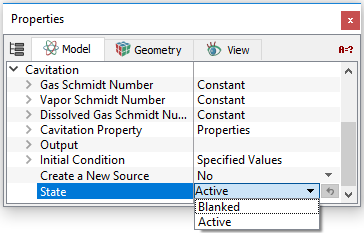
SourceThe Source is a volume condition in the Cavitation module pertaining to selected Volumes. To specify the source, click Create a New Source (see Figure 5.74) in the Cavitation module as follows:
Table 5.19 lists the potential sources terms that can be added in the respective modelling equations:
|
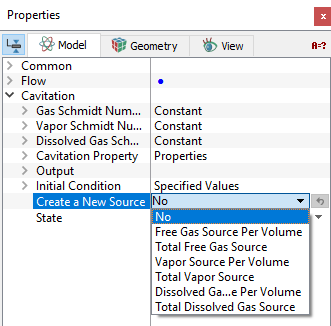
Multiple sources may be created for a selected volume. Sources may be added as a Total Source (kg) or a Source per Volume (kg/m3).
Remove This Source
This input removes the Source in a selected volume.
|
Note: If no source has been created, the Source heading is not displayed. Multiple sources are numbered sequentially, e.g. Source 1, Source 2, Source 3, etc. If a source is removed, the remaining sources are renumbered starting at 1. |